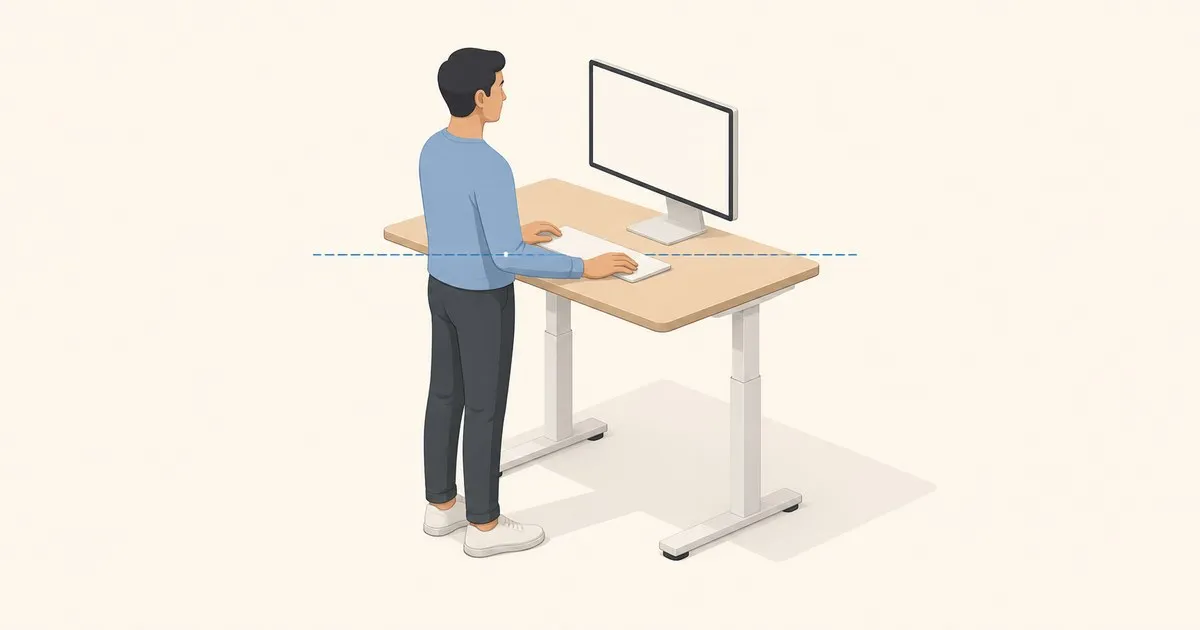
How high should a standing desk be? The answer is your elbow height — the distance from the floor to the underside of your forearm when your arms hang naturally and your elbows bend to 90 degrees. That single measurement determines the correct desk surface height for keyboard and mouse work, regardless of body height and regardless of what the manufacturer’s preset says. It also decides which frames are usable for you at all, which is why height range leads our standing desk picks under $500.
Everything else is adjustment around that number.
How to Measure Your Standing Desk Height
Stand in the shoes you normally wear at your desk. Let your arms drop to your sides, then bend your elbows to 90 degrees without raising your shoulders. Measure from the floor to the underside of your forearm — or press your forearm against a wall and mark it. That distance is your target desk surface height.
For most light computer work (typing, mouse use), set the desk at or 1–2 inches below that measurement. Wrists should stay straight and neutral when your hands rest on the keyboard — neither bent up nor angled down. Shoulders should be relaxed, not shrugged.
OSHA’s computer workstation guidelines specify that keyboard surfaces should allow forearms parallel to the floor with elbows at approximately 90 degrees. For work requiring downward force — drawing by hand, cutting, assembly — drop the surface 4–6 inches below elbow height. For close-detail precision work, raise it 2–4 inches above.
Quick-Reference Table by Body Height
Use this table to set a starting position before measuring precisely. These ranges are based on typical elbow-to-height ratios across adults; the actual measurement overrides the table when the two disagree.
| Body Height | Starting Desk Height Range |
|---|---|
| 5’0” (152 cm) | 36–38” (91–97 cm) |
| 5’2” (157 cm) | 37–39” (94–99 cm) |
| 5’4” (163 cm) | 39–41” (99–104 cm) |
| 5’6” (168 cm) | 40–42” (102–107 cm) |
| 5’8” (173 cm) | 41–43” (104–109 cm) |
| 5’10” (178 cm) | 43–44” (109–112 cm) |
| 6’0” (183 cm) | 44–46” (112–117 cm) |
| 6’2” (188 cm) | 45–47” (114–119 cm) |
| 6’4” (193 cm) | 46–48” (117–122 cm) |
Ranges exist because elbow height varies between people of the same stature. A 5’8” person with relatively short arms may land at 41”; another with longer arms may land at 43”. The table narrows the search; the elbow measurement closes it.
What Adjustability Range You Actually Need
BIFMA G1-2013 recommended roughly 22.5–48.7 inches of finished-surface travel, from a 5th-percentile female seated to a 95th-percentile male standing. The guideline has since been replaced by ANSI/BIFMA X10.1-2024. Frames that top out near 46–47 inches are the ones that leave users above about 6’1” short. Budget frames cut the top of that range first; see best standing desk under $300.
Before purchasing, confirm two numbers from the spec sheet: the maximum height (your standing elbow height must fit within it) and the minimum height (your seated elbow height — typically 26–29 inches — must also fit). A desk that maxes out at 47” but bottoms at 28” excludes shorter users in seated mode.
BIFMA’s G1 height guidance concerns ergonomic dimensions. ANSI/BIFMA X5.5 covers structural testing for desk and table products. Passing structural tests does not establish that a desk reaches your required sitting and standing heights; check the actual adjustment range.
Monitor Height at Standing Position
Set monitor height independently of keyboard height. OSHA’s monitor guidance places the screen top at or below eye level, with the center below horizontal gaze and a preferred viewing distance of 20–40 inches. Check these relationships in both sitting and standing positions.
The common failure: a monitor placed directly on the desk surface at keyboard height leaves the top of the screen 8–12 inches below eye level, producing forward head posture and upper-back strain within an hour.
A counterbalanced monitor arm solves this cleanly. It decouples screen height from desk surface height, so you can dial each independently. When you transition from sitting to standing, the desk moves; the monitor arm compensates without you having to reposition the screen separately. Budget arms mostly use gas springs, which can lose holding force over the years; mechanical-spring arms such as the Ergotron LX (Constant Force) hold position across the range but need re-tensioning when you change monitors. MonitorArmGuide breaks down that trade-off in gas-spring vs mechanical-spring arms.
What Goes Wrong at the Wrong Height
Too high: Shoulders shrug to reach the keyboard. Trapezius tension appears within 20 minutes. Wrists bend upward into extension while typing, increasing pressure on the carpal tunnel.
Too low: You round forward and drop your head to see the screen. Lower back fatigue shows up after 45 minutes. People who report that standing “hurts their back” — after doing everything else correctly — most often have the desk surface 3–5 inches too low.
Anyone spending 8–10 hours at a workstation accumulates more standing hours than a typical office worker does. A setup that’s 2 inches off in either direction compounds into significant cumulative strain across a working week.
California’s standing workstation guidelines recommend providing a footrest (4–6 inches high) or anti-fatigue mat at standing stations. Unrelieved static standing — even at the correct height — produces fatigue from locked joints. A footrest shifts posture slightly, reduces monotony, and distributes load.
Verifying the Setup After Adjustment
Set your desk to your elbow height, then check:
- Place hands on the keyboard. Forearms should be parallel to the floor or angled very slightly downward — not angled up.
- Wrists should be straight in line with your forearms. No flexion (angled down), no extension (angled up).
- Monitor top should be at or below eye level, with the screen center below horizontal gaze. Keep your head level and use the preferred 20–40-inch viewing range.
Run a 90-minute working session at the new height. Discomfort after that window should show up in your legs (standing fatigue from static loading), not in your upper traps, neck, or wrists; if it shows up there, height is still off. Leg fatigue is a floor problem, covered in footrests and anti-fatigue mats ranked.
The adjustment takes five minutes. A standing desk set to the wrong height defeats most of the ergonomic benefit of owning one.
To skip the arithmetic entirely, our ergonomic setup calculator returns your standing desk height alongside your sitting desk height, seat height, and monitor position from a single body-height entry. And if the desk will not travel to the height you just worked out, the keypad is usually asking for a recalibration rather than reporting a fault: see standing desk won’t go up.


